Instant Responses
Type # to insert saved responses without leaving the keyboard. Build complex replies from multiple templates in seconds.
Manage every customer request from first contact to resolution. Track status, assign ownership, and never lose a ticket again.
Every ticket belongs to exactly one person. No confusion about who is responsible.
Every public, private, and external note on one page. Full context for every interaction.
Active, Waiting, Solved, Escalated. Know exactly where every ticket stands.
Organize by department, type, or priority. Filter and report on any dimension.
See who is viewing a ticket in real-time. Prevent duplicate replies.
Full-text search with wildcards, filters, and date ranges. Find any ticket in seconds.
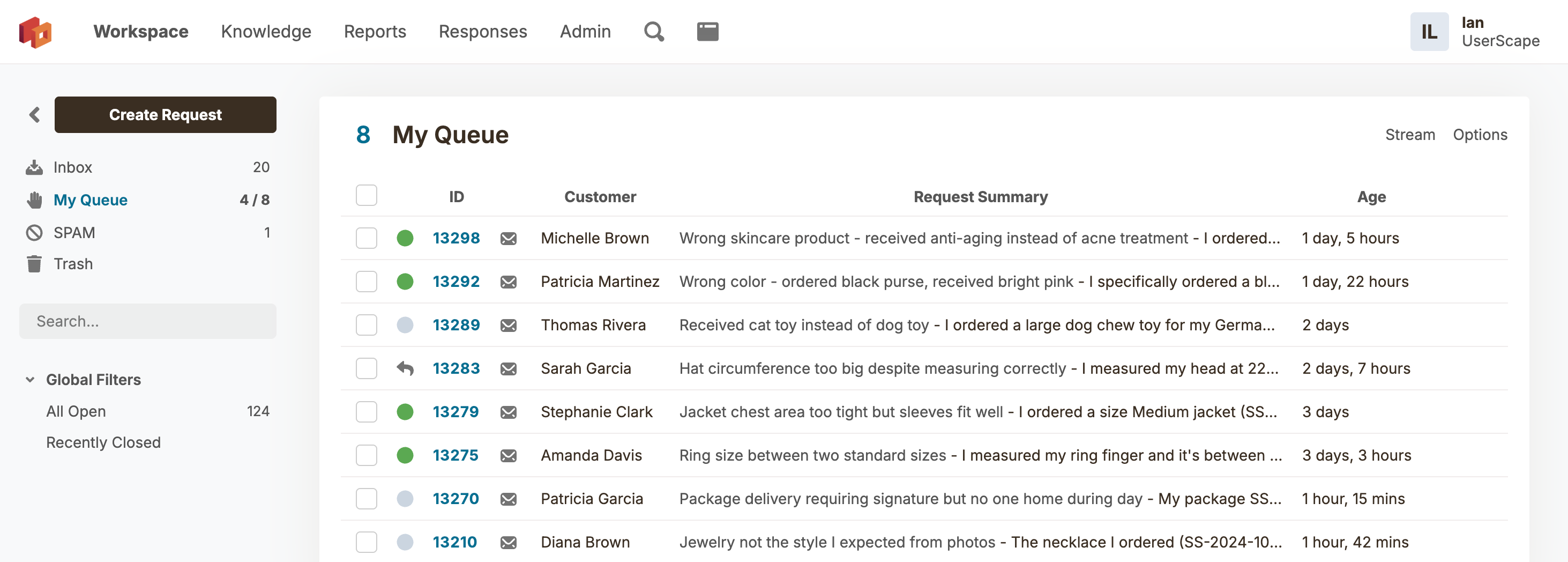
The workspace is where your team lives. New requests arrive in the Inbox. Assign them to move to an agent's personal My Queue. Create custom Filters for any scenario.
HelpSpot looks and feels like the email client your team already knows. No week-long training sessions. No confusion. Just open it up and start resolving tickets.
Create custom filter criteria
Create filters for any scenario. One for escalated issues. Another for requests closed this week. A third for when you're wearing your manager hat. Filters work with batch operations, so you can act on dozens or hundreds of tickets at once.
Every request flows through HelpSpot. Email, portal, API—all managed in one place with clear outputs.
Payment keeps failing when I try to process my invoice.
Account has outstanding balance. Blocking charges.
Cleared the hold. Your payment should process now.
Each ticket shows the complete picture: customer info, full history, status, category, and custom fields. Three note types keep communication organized. Merge duplicates in two clicks.
Before you type a word, know everything. HelpSpot automatically checks for other open tickets from the same customer and surfaces their complete history. Search by email address, company domain, or customer ID to find related requests instantly.
Live Lookup pulls customer data from your existing systems directly into HelpSpot. When a ticket arrives, agents see account details, purchase history, contract status, or employee info without switching tabs. Your CRM remains the single source of truth.
Not every message belongs in the customer's inbox. HelpSpot's three note types keep your communication organized. Public notes go to customers. Private notes stay internal for team coordination. External notes let you communicate with vendors or other departments without mixing messages.
Hi Jane, I've reviewed your account and the issue has been resolved. Your password has been reset and you should receive login instructions shortly. Let us know if you need anything else.
Checked with accounting. This customer is on Enterprise plan with priority SLA. Escalate to Tier 2 if the issue persists after the password reset.
Okta Support — Can you verify the SSO configuration for acmecorp.com? Our customer is unable to authenticate after a recent identity provider change.
Type # to insert saved responses without leaving the keyboard. Build complex replies from multiple templates in seconds.
Type @name to instantly alert team members without reassigning the ticket.
Log time spent on each ticket. Report on effort by category, agent, or customer.
Set follow-up reminders on any request. Get notified at exactly the right time.
Follow any ticket without being assigned. Perfect for managers tracking escalations.
Handle high volume with batch assign, close, merge, and respond. Process hundreds at once.
Red bar highlighting for priority items. Triggers automations and notifications.
11 field types. Dropdowns, drill-downs, dates, regex-validated inputs, and more.
Summarize requests, adjust tone, and translate text instantly. Included at no extra cost. Explore all AI features.
Set response and resolution targets. Get alerts before you miss a deadline.
From first contact to resolution, every step is tracked.
Email, portal, or API. Every request lands in your unified inbox.
One agent takes ownership. No ambiguity about who is responsible.
Close with confidence. Full history preserved for future reference.
Insert a response and watch the ticket transform. Status, category, custom fields, note type, CC recipients, email subject. All set automatically.
Never leave the keyboard. Type # and start typing the response name. Autocomplete does the rest.
Personalize every response with customer data, ticket info, and custom field values.
Full templates, partial paragraphs, or single links. Mix and match to build any reply.
Combine multiple responses into one polished reply. Greeting + steps + closing.
Attach PDFs and files to responses. Insert the response, file attaches automatically.
Group responses by folder. Control visibility by team. HR sees HR responses.
Process changed? Update the response once. Every agent sends the correct information from that moment on. No retraining needed.
HelpSpot has been refined for over 20 years under extreme conditions. Example stats from a longtime customer:
Trusted by the United States Space Force, Northrop Grumman, and the University of Michigan for mission-critical support.
Same price, same features. Choose the deployment that works for you.
Same powerful features and pricing across all hosting options.
US-East Region
Dedicated AWS infrastructure with 99.9% uptime. Managed updates and automated backups.
Frankfurt Region
GDPR-compliant hosting. Full data sovereignty with all information isolated within the EU.
On-Premise Infrastructure
Complete control on your own hardware. Ideal for air-gapped networks or strict compliance.
Maximum Control & Data ResidencyEverything you need to know about HelpSpot's ticketing system.
Every ticket is assigned to exactly one agent. This eliminates confusion about who is responsible. Tickets can be manually assigned, auto-assigned via rules, or claimed from the shared inbox. The assigned agent sees the ticket in their personal My Queue.
Yes. HelpSpot offers four auto-assignment methods: Round Robin distributes evenly across your team, Least Requests assigns to whoever has the smallest queue, Default Contact routes to a specific person, and Random spreads the load. Assignment can also be triggered by mail rules, categories, or custom automation.
HelpSpot includes default statuses like Active, Waiting, and Solved, but you can customize them completely. Add statuses like Escalated, Pending Vendor, or On Hold. Each status can trigger different behaviors and appear in different filters.
Categories are the primary way to organize requests. Create categories by department (HR, IT, Sales), problem type (Server, Software, Hardware), or location. Each category can have its own staff assignments, custom fields, and automation rules. Category groupings let you nest related categories under parent folders. Use our support ticket categorization guide to choose a structure your team can apply consistently.
Custom fields capture structured data specific to your workflow. Choose from 11 field types: dropdowns, text fields, dates, checkboxes, numbers, and more. Fields can be required, category-specific, and shown on your customer portal. All custom fields are filterable and reportable.
Yes. Agents can log time against each ticket, either manually or with start/stop timers. Time tracking data flows into reports so you can see effort by category, customer, or agent. This is invaluable for billing, capacity planning, and performance analysis.
Two ways: First, single assignment means only one person is responsible. Second, collision detection shows you in real-time if another agent is viewing the same ticket. These features together eliminate the embarrassing "We both replied" problem.
Closed tickets remain fully searchable and accessible. The complete history is preserved indefinitely. If a customer replies to a closed ticket, it automatically reopens and returns to your inbox for follow-up.
When an outage generates hundreds of emails, select all related requests and click batch reply. Write one response that goes to all customers at once. Each customer can still reply individually, and tickets are managed separately after. Create a temporary filter to reply again to the same group if needed.
Live Lookup connects HelpSpot to your external systems in real-time. When a ticket arrives, HelpSpot queries your CRM, Active Directory, ERP, or any API to pull customer data. Agents see account details, order history, contract status, or employee info without leaving HelpSpot. Your CRM stays the single source of truth—no data sync required. Live Lookup can run automatically via triggers or manually when agents need more context. See more on the developer and integrations page.
Join the teams who switched from chaos to HelpSpot's essential order. Download on-premise or start in the cloud today.
Manage every customer request from first contact to resolution. Track status, assign ownership, and never lose a ticket again.